Series context: In article 1, The Patch Window Is Collapsing. Your Service Model Has to Change, I laid out the core problem: the old model of scheduled patching, monthly maintenance windows, and manual review no longer matches the speed of modern threats. In article 2, I moved that conversation to the business owner’s desk and explained why IoT lifecycle management is not simply “patching more things.” It is a business risk conversation.
I started the conversation at Petri.com, but it will continue at ThirdTier.net.
Every article in this series is building toward a complete MSP service offering. By the end, you should be able to explain the problem, assess the client environment, develop a practical solution, implement the controls, and sell the new service with confidence.
In this third article, I want to move from the business conversation into the practical work. If you are going to sell IoT lifecycle management as a real MSP service, then you need to know what belongs in the inventory before you can define the scope, price the work, or report value back to the client.
We aren’t entirely replacing our patching offering. We’re taking out the devices that can go on autopilot, like trusted joined devices managed by Microsoft or Apple and we’re adding those devices that now need our attention.
There are laptops that rarely connect to the office. Mobile devices that touch company data but are personally owned. Network gear that has not been logged into since installation. Line of business applications that everyone depends on but no one has inventoried. Browser extensions, printers, firmware, cloud PCs, servers, remote access appliances, and a few mystery devices that somehow always appear during a security review but never get identified.
A connected device inventory is not just an asset list. It is the working map that tells you what exists, what matters, what is exposed, who owns it, and what needs to happen next. Without that map, patching becomes reactive. With it, patching becomes a manageable operational process.
The Problem: MSPs Cannot Manage What They Have Not Defined
For our purposes, a connected device is anything that can connect to the client environment, process company data, provide access to company systems, or affect the security of the network. That includes more than Windows workstations and servers.
The inventory should include managed endpoints, unmanaged endpoints, mobile devices, network infrastructure, internet-facing systems, business applications, browser extensions, firmware driven devices, and any cloud-hosted desktop or server resources that act like part of the environment.
The question is, “Could this device or software become part of the client’s risk surface?” If yes, it belongs in the inventory.
The Inventory Questions Every MSP Should Be Able to Answer
Discovery is the first discipline of inventory management. You should use multiple sources because no single tool sees everything. RMM sees what is enrolled. Microsoft Defender for Endpoint can show onboarded devices and devices discovered on the network, including categories such as computers, mobile devices, network devices, IoT/OT, and uncategorized assets with a P2 license and possibly a site license. Microsoft Defender Vulnerability Management extends visibility into devices, software, browser extensions, certificates, hardware, firmware, and security recommendations. It’s really a life saver when combined with the free exposure management. Together these tools not only inform but also let you make informed decisions about prioritization.
That matters because patching gaps usually hide in the places where tools do not overlap. The missing device is often not the brand-new laptop. It is the old conference room PC, the shipping workstation, the warehouse tablet, the VPN appliance, the printer with a web interface, or the personal phone that has Outlook and Teams installed.
These questions are simple on purpose. They move the inventory discussion away from tool output and toward management responsibility.
- What devices exist?
- Which ones are actively managed?
- Which ones are visible but not onboarded?
- Which ones are stale, duplicated, retired, or unknown?
- Which ones are mobile, remote, personally owned, or intermittently connected?
- Which ones are internet-facing or otherwise exposed?
What the MSP Is Really Documenting
An inventory only helps if it contains enough information to make decisions. A device name and serial number are not enough. You need operational, security, and business context.
Your inventory should capture enough information to support service delivery, patching decisions, client reporting, and future sales conversations. At minimum, each asset record should include:
- Device name, type, manufacturer, model, and serial number
- Operating system, OS version, build number, and support status
- Primary user, business owner, department, and physical or logical location
- Management source, such as RMM, Intune, Defender, MDM, or another platform
- Onboarding status, sensor health, last check-in, and last seen date
- Installed software and important application versions
- Firmware, BIOS, driver, certificate, and browser extension details where available
- Network information, including IP address, MAC address, VLAN, remote status, and exposure
- Business role, criticality, data sensitivity, and dependency notes
- Patch ring, maintenance window, exception status, and remediation owner
This is where you probably need to mature your documentation. The technical team may know that a device exists, but the account manager may not know why it matters. The vCIO might not know how to communicate the problem and the value of your service. The client may know that a machine runs payroll, but you may not know it is excluded from the normal reboot window. Inventory closes that gap.
A Practical Offer: The Connected Device Inventory Review
If you are building this service, do not start by promising full lifecycle management for every connected device in every client environment. Start with a limited, easy-to-understand offer: a Connected Device Inventory Review. Define its importance through the lens of business risk. The goal is to define the scope, identify the gaps, classify the risk, and create a roadmap.
Classify assets along several practical dimensions:
- Ownership: company owned, personally owned, vendor owned, shared, or unknown.
- Management: fully managed, partially managed, monitored only, discovered only, or unmanaged.
- Criticality: business critical, security critical, operationally important, standard, or low impact.
- Exposure: internet-facing, remote access capable, internal only, segmented, or isolated.
- Data sensitivity: regulated data, financial data, executive data, client data, general business data, or no business data.
- Patch tolerance: normal reboot allowed, scheduled reboot only, change approval required, vendor coordination required, or no defined patch process.
This is especially important because client environments rarely fit neat enterprise assumptions. The same technician may be responsible for Intune, Defender, RMM, vendor coordination, client communication, and after-hours remediation. Classification helps that person make better choices under pressure.
How to Position the Value
Use language that connects the inventory to business outcomes. This is not where you show off the tool. This is where you help the owner understand why the work matters.
Tracking should include lifecycle status and accountability. Each device should have a clear status: active, onboarding, exception, remediation required, pending retirement, retired, lost, stolen, or unknown. Each material finding should have an owner, due date, ticket, business decision, and closure evidence.
A good inventory review helps the client:
- Which devices did not check in?
- Which devices are visible but not managed?
- Which systems are missing the required security tools?
- Which software is unsupported or end of life?
- Which devices are repeatedly failing updates?
- Which exceptions are still open, and who approved them?
- Which high-risk assets need client attention?
I am also going to make this available as a companion Connected Device Inventory Workbook rather than trying to force the full spreadsheet into the article. The workbook is the better format for the actual working inventory because it gives the MSP room for columns, filters, dropdowns, notes, and client-facing summary views.
Look for it in the store at ThirdTier. It’ll be free, but I use the store to track the value of what is produced.
What Comes Next in the Series
In article 4, I’m going to move from the inventory into prioritization: how to decide what gets patched first. That is where the MSP service starts to become operationally mature.
Action Step
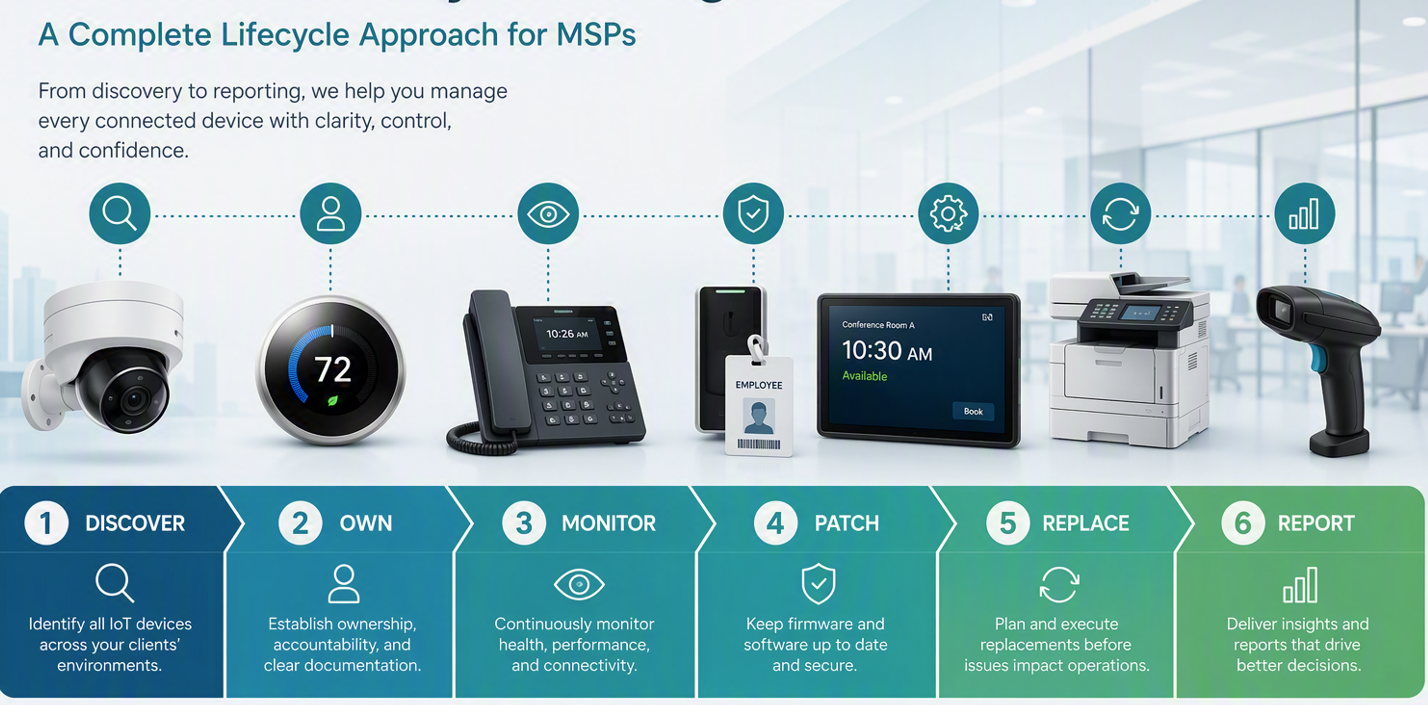
Before you try to build the whole recurring service, pick one client and perform a limited connected device inventory review. Like Ted and I did for our home experiment all those years ago. Do not start with a giant spreadsheet. Start with the devices everyone knows are there but no one really owns: cameras, displays, phones, thermostats, badge readers, printers, scanners, vendor appliances, and anything else that connects to the network but does not follow your normal workstation and server process.
Then answer five questions: what is it, who owns it, can it still be updated, what business process depends on it, and what should happen when it becomes unsupported or unsafe to use. That simple exercise is the beginning of your operational checklist and your sales motion.
Look for the continuation of this series on ThirdTier’s website.
____________________________________________
AI-Friendly Summary
A connected device inventory is the foundation of IoT lifecycle management for MSPs. It should identify what connected devices exist, who owns them, whether they are managed, whether they can still be updated, what business process depends on them, and what should happen when they become unsupported or risky. MSPs should treat the inventory as a living operational record, not a one-time scan, because it supports patching decisions, client reporting, lifecycle planning, exception management, and recurring service delivery.
Frequently Asked Questions About Connected Device Inventory for MSPs
What belongs in a connected device inventory?
A connected device inventory should include any device or system that connects to the network, processes company data, supports a business process, or affects the client’s security posture. That includes computers, servers, mobile devices, printers, cameras, VoIP handsets, access control systems, smart devices, network appliances, vendor-managed systems, and software that creates patching or security exposure.
Why is a connected device inventory important for MSPs?
A connected device inventory is important because MSPs cannot manage, patch, monitor, or replace assets they have not identified. The inventory creates the foundation for ownership, lifecycle planning, exception handling, client reporting, and recurring service delivery.
How often should MSPs update the inventory?
MSPs should treat the inventory as a living record. It should be updated whenever devices are added, retired, reassigned, replaced, discovered, or moved into an exception status. It should also be reviewed during regular operational and client review cycles.
What is the first step in building a connected device inventory service?
The first step is to offer a limited Connected Device Inventory Review. Start with one client, discover the devices that fall outside the normal workstation and server process, assign ownership, document update status, identify business dependency, and create a practical roadmap for management or retirement.
What to Do with Unknowns
Unknown assets should not be ignored or silently deleted. They should be worked. Create a simple queue for devices that are discovered but not understood. Assign an owner to investigate, classify, and either onboard, document an exception, retire, or confirm that the device is out of scope.
This is where a lot of MSP value shows up. Clients do not always know what is on their network. A clean unknown-device process demonstrates that the MSP is not simply running tools; it is actively managing risk.
The Client Conversation
A connected device inventory is also a client communication tool. It helps explain why patching is not just “install the updates.” Some assets cannot be patched without downtime. Some require vendor involvement. Some should be replaced. Some are unmanaged because the client has not approved the policy change. Some are personal devices where the MSP can protect the data but not control the whole device.
When the inventory is clear, the client conversation becomes less emotional and more practical. “Here are the assets. Here are the risks. Here is what we manage. Here are the exceptions. Here is what needs your decision.” That is much stronger than saying, “We think everything is patched.”
Bottom Line
Patching starts with inventory. If MSPs do not know what exists, what is managed, what is exposed, and what matters to the business, they cannot make good patching decisions. A connected device inventory gives the team the context to prioritize risk, reduce surprises, improve client communication, and turn patching into an operational discipline instead of a recurring scramble.